

Have you heard about the Microsoft 365 learning pathway? A SharePoint site with free and regularly updated Microsoft 365 training material? If not, take a look here: https://aka.ms/M365LPDocs
If you have heard about it and already have it set up in your environment, why not add it to Microsoft Teams so you, and your users, can access it whenever you need it?
Let’s add the Learning pathway as an app in Microsoft Teams and also pin it the left rail.
Get the package
Karuana Gatimo has made this possible, and I will follow her instructions to show you how you can do it.
First off, navigate to Kaurana’s GitHub repository and download the GettingStarted.zip. This file contains all the required files, a configuration JASON-file, and two icon files. There’s also an installandconfig.md file with configurations and installation instructions.
Who’s that Json guy?!
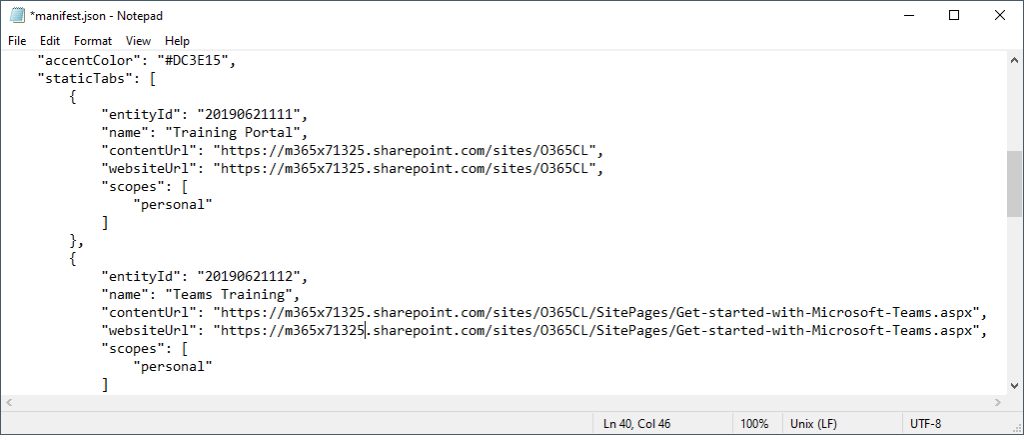
Update the manifest.json file and replace the target URL’s to match your Learning pathway site URL. Make any other adjustments you feel necessary and save the file.
Save the three files into a .zip file that we’ll be uploading in Teams in just a bit.
Upload the app in Teams
Open Microsoft Teams and go to Apps, select Upload a custom app (requires permissions to upload custom apps). Select the ZIP file we created in the previous step:
Learning pathways can now be opened in Teams or added to a channel, like any other app in Teams, very convenient.
Pin it to the left rail
But why not take it a step further and pin it in the left rail in Teams? Yeah, let do that!
As a Teams admin, navigate to Teams app and Setup policies in Teams admin center. Either create a new app setup policy or edit an existing. I want all my users to have easy access to Learning pathways, so I’ll add it to the Global policy. Click Add apps and search for the already uploaded app.
Move the app up or down to where you want it to appear in the left rail.
Save, and then you wait. An hour or until the next day is typically a good timeframe to aim for.
And then, voila! There it is:
More info about the app package can be found here.
More info about the app policy can be found here.
I want to personally thank you Karuana for everything you do for the Teams product and the community, your commitment and devotion is a true inspiration to me, and I’m sure many others. Thank you.
For more information about the Learning pathway please take a look at my previous post, in Swedish: https://www.msteamsswe.se/utbildningsportal-inte-bara-for-teams/ and https://www.msteamsswe.se/installera-microsoft-365-learning-pathways/

Skriv en kommentar